I recently bought a new laptop, a Dell Latitude D630, which is equipped with an internal modem, with a Conexant chipset. You can find the Linux drivers for this modem at linuxant.com, but you need to pay a registration fee for getting the full speed for these drivers (I did this in the past for my previous laptops). However, Dell provides its users with free Conexant drivers for its laptops! Unfortunately, for the moment, these drivers do not seem to be updated for the Kubuntu 7.10 I installed on my laptop.
Well, I have ADSL at my place, but sometimes, I work in places where ADSL is not available, and I can rely only on the old telephone line, that's why I'd need to use the modem.
This time, I decided not to pay for the drivers, and wait for Dell to update its drivers... but I still needed to access the Internet through the telephone. I then remembered I still had an old external serial 56k modem... well... I connected, and configured it with kppp and in a moment I was surfing the Internet under Linux :-)
Ah! the good ol' serial modems! Ready to be used! Not like those fake soft(win)modems... and all those flashing lights :-)
Saturday, February 23, 2008
The good ol' serial modems


Farewell, Espon Stylus Color II
.jpg) It's time to say goodbye to my good ol' Epson Stylus Color II, after 10 years!
It's time to say goodbye to my good ol' Epson Stylus Color II, after 10 years!
This was my first ink jet color printer; I bought it for the exam of "Calcolo Numerico", and it wasn't quite cheap at that time.
The color printing is quite ugly, especially when comparing it to the quality of today color printers, but at that time, that was the only thing I could afford.
The printer was quite slow, and the paper was continuously jamming.
I had kept this printer in my office for "quick" prints, instead of using the network printer that was not very near.
However, now the sheets are not loaded very well any more, the ink cartridges are harder to find (and very expensive), so I can't see any more reason to keep it.
But it's kind of sad getting rid of my first ink jet printer... ;-)
.jpg)

Tuesday, January 29, 2008
Gengetopt Eclipse
 I finally made it to create my very first eclipse plugin! :-)
Since I'm using eclipse for most of the time I wanted to get my hands dirty also with eclipse programming!
The eclipse plugin architecture and framework is very powerful, but I can't say it's quite easy to understand... at least at the very beginning. But probably this is only the main drawback of every framework (e.g., all the GUI frameworks...) and with the right documentation, the learning curve gets better every day.
Besides the documentation you find on-line, I've been using the book Eclipse: Building Commercial Quality Plug-ins, Second Edition, by Eric Clayberg and Dan Rubel (Addison-Wesley, Second Edition, 2006), which really does a very good job in explaining the eclipse plugin architecture in many details and providing a lot of code (without which, it would be otherwise quite hard to get acquainted with eclipse programming).
The plugin I decided to develop was an editor for GNU Gengetopt files, so that I could easily write those files in all my GNU projects (which are in C++, and I'm using eclipse also for them).
As for eclipse editor programming, the book above did not help a lot... fortunately, I found some more information in the book Eclipse in Action, which is a little bit out of date, but it still contains valueable information.
Here's some more info:
You can find Gengetopt Eclipse here: http://ggoeclipse.sourceforge.net
Gengetopt Eclipse is an Eclipse plugin providing an editor for GNU Gengetopt input files.
For the moment, this editor provides syntax highlighting and code completion (new features will be added in the future).
There is currently no associated builder, since it is assumed that gengetopt files are used in projects using makefiles.
Gengetopt eclipse is free and open source, under the GNU GPL License.
Installation
As with most eclipse plugins, the easiest way to install gengetopt eclipse is via the eclipse update manager:- Help -> Software Updates -> Find and Install
- Search for new features to install
- New Remote Site
- Name: Gengetopt Eclipse, URL: http://ggoeclipse.sf.net/update
Sources
The sources of gengetopt eclipse can be obtained via CVS (you can find the instructions here: http://sourceforge.net/projects/ggoeclipse)Screenshot


Monday, January 28, 2008
Foxmark or Del.icio.us?
I've always taken care of synchronizing my bookmarks (and also other personal data, such as email, etc.) with a central repository, since I'm using several computers and laptops and I want to able to access them anywhere. Lately, I had been using the firefox bookmark synchronizer extension, which relies on a HTTP or FTP server. This had also the advantage to make the bookmarks publicly available. The HTTP server, where the main bookmark copy was stored, crashed, and I did not feel to reinstall all the webdav stuff just for my bookmarks. Moreover, I had heard of new free services for storing bookmarks. I must admit I did not perform a deep research and I only ended up with two names to try: Foxmark and Del.icio.us.
The latter is surely more than a bookmark synchronizer: it's oriented to share your bookmarks with other people and to tag them with as many tags as you see fit; social networking.
Del.icio.us... well... the first impression was not good... all the bookmarks are twisted in a flat manner, no hierarchies anymore... only tags... probably I still haven't got used to tags, but I prefer the tree structure. I was also willing to try it for some time, but when I then tried to export the bookmarks from del.icio.us I realized that the tree structure was lost forever... argh... no way... for the moment I'll stay with foxmarks.
But I'll try to get a little bit more into social networking and del.icio.us :-)
Tuesday, January 22, 2008
Goodbye Sony Vaio
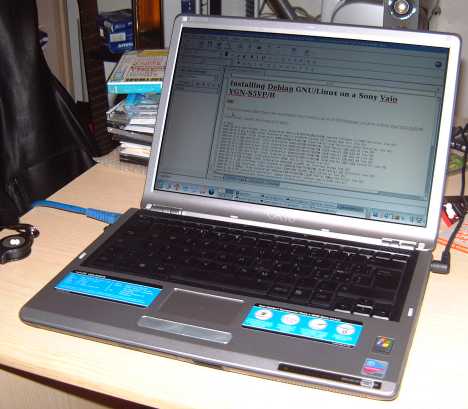
I can't say I'm sorry since I didn't like this laptop too much... probably what made me quite biased was the bad story concerning the extended battery (I talked about this issue in this blog).
However, before returning it, a few months ago, I tried to install on this laptop also Kubuntu (I was already using Debian).
The installation was quite smooth and everything seems to work (also things that were not working in Debian, or were quite hard to configure).
You can find details about this installation here: http://www.lorenzobettini.it/linux/kubuntu_vaio.
Tuesday, January 15, 2008
GNU Gengetopt 2.22
The new release of GNU Gengetopt is available.
Apart from the classical bugfixes, the main change in this release is the generated code which should be now shorter (in most cases) and, most of all, cleaner and easier to understand (hopefully). Surely it should be easier now to add some new features. In particular the handling of an option (and its possible argument) is completely delegate to a single function (update_arg) which can handle all the combinations of kinds of options (required or optional options, options with optional arguments, all the types, etc.); also the corresponding function for dealing with multiple options internally relies on this function.
During the refactoring of the generated code, I took the chance to add some requested features (and this somehow proved that the new generated code is easier to deal with):
- the automatic error printing done by the getopt_long function can now be suppressed by passing an additional parameter to the generated function (so that the programmer can customize the error reporting or also consider what getopt_long thinks is an error not an error)
- options with values can now be given a specific type (the same types available for other options), and, in particular, the type enum is available for this kind of options, and this will correspond to a C enum in the generated file
- when there are more than one kind of help output (e.g., in the presence of hidden options) the generated help strings avoid duplicating string constant, so that the memory footprint should be minor
- options can be given an additional field, details, where one can specify a more verbose option description; this will add to the generated parser the command line option --detailed-help; in this case also the details will be printed. This way, the user can have the standard help output and a more detailed one.
- the programmer can completely handle manually --help and --version, even redefine them. In particular, if the gengetopt options --no-help and --no-version are specified, gengetopt will not generate the automatic --help and --version options in the generated parser.
Thursday, January 03, 2008
Compacting Thunderbird Addressbook
Since I've been using Netscape mailer and then Thunderbird I've always noticed that the size of the address book, i.e., the file abook.mab, never decreases, in spite of removing addresses from it. Actually, it always increases. I've never found this documented, and I've never found a way to compact it from Thunderbird itself.
Since I'm synchronizing some files of thunderbird, including the address book, (with rsync) for using them on several machines, it gets quite slow upon synchronizing the address book that now reached 1Mb in size!
I usually apply this manual procedure for reducing its size (and this also compacts the address book of course). Here are the steps I follow:
- Open the addressbook and export it into LDIF format (let's assume I save this file with name exported.ldif)
- Close Thunderbird
- Delete the file abook.mab (or, for safety, move it somewhere else) from your thunderbird profile directory
- Open Thunderbird and the addressbook (which by now is empty)
- Import the above LDIF file
- Close Thunderbird
- In the directory of your thunderbird profile you should now have two .mab files, the new abook.mab and another .mab containing the imported addresses (in my system it is called impab.mab)
- Move this file into abook.map (in my case, and under Linux, 'mv impab.mab abook.mab')
- Open Thunderbird and check that the addressbook contains your contacts
If you happen to know another procedure to compact thunderbird addressbook, please let me know!


 Posts
Posts


