Lately I started to try to develop applications for the Nokia N900, and the Maemo platform uses my beloved framework Qt :)
In particular, Nokia started to develop the Qt-Mobility Framework. Quoting from their white paper:
The Qt Mobility Project presents a collection of related software frameworks and interfaces. The objective being to deliver new Qt APIs for mobile application developers. Using these new APIs, developers will be able to create cross-platform applications targeting Maemo, Symbian and other platforms. This suite of features also has components that will be desirable to all users, not just those with mobile devices, so Mobility has advantages even for the desktop user.
Thus, I wanted to try this project also on my Desktop (after all the intent of this framework is cross-platform development), and tried to compile qt-mobility on my Ubuntu/Kubuntu desktop. Unfortunately, I experienced many problems which now I seem to have solved, thus I'd like to share the steps to build qt-mobility from sources.
First of all, when installing qt-mobility after compilation, some files will be created in your current Qt installation. Thus, since I wouldn't want to spoil my qt installation from ubuntu packages, which is installed in system path, I downloaded the new qt framework 4.6.3 from the
Nokia download site, and installed it in a path of my home:
~/usr/local/Trolltech/qtsdk-2010.03.
Then, I installed some packages that are useful to build qt-mobility and to enjoy media contents such as mp3 and videos, relying on gstreamer (not all these packages may be necessary, but after some tests, at least these packages will make things work):
sudo apt-get install libasound2-dev libbluetooth-dev libgstreamer0.10-dev libgstreamer-plugins-base0.10-dev network-manager-dev libxv-dev gstreamer-tools gstreamer0.10-plugins-base gstreamer0.10-ffmpeg w32codecs ubuntu-restricted-extras gstreamer0.10-plugins-good freeglut3-dev
Then, you need to get the sources of qt-mobility, and I got them from the git repository
git clone git://gitorious.org/qt-mobility/qt-mobility.git
However, you may want to get the stable sources (e.g., from
qt-mobility download).
Since I'm a big fan of "shadow builds" which won't spoil your source directory, I built qt-mobility in another directory of my home, separate from the directory where I have the sources of qt-mobility (in this example the sources are in
~/install/qt-mobility):
~/build/qt-mobility/qt-4.6.3 (I specified the qt version I'm building qt-mobility with, since I may want to experiment with different qt versions):
- cd ~/build/qt-mobility/qt-4.6.3
- PATH=~/usr/local/Trolltech/qtsdk-2010.03/qt/bin:$PATH ~/install/qt-mobility/configure -examples -prefix ~/usr/local/Trolltech/qt-mobility > output.txt
Note that I temporarily change the PATH environment variable so that the configure script will use my local qt installation; I specify that I want to build the examples, and I redirect the output in a text file. This will also allows you to see possible errors during the configuration step (e.g., missing packages). Note also that I will install (once built) qt-mobility in my home directory in
~/usr/local/Trolltech/qt-mobility.
Once the configuration step is successful, you can start building qt-mobility and then install it:
During the installation, if you take a look at the output, you will note that some files will be added to your qt installation, e.g.,
- install -m 644 -p /home/bettini/build/qt-mobility/qt-4.6.3/features/mobility.prf /home/bettini/usr/local/Trolltech/qtsdk-2010.03/qt/mkspecs/features/
- install -m 644 -p /home/bettini/build/qt-mobility/qt-4.6.3/features/mobilityconfig.prf /home/bettini/usr/local/Trolltech/qtsdk-2010.03/qt/mkspecs/features/
This way qt-mobility will be integrated in your qt framework (at least, this is what I presume).
Now, you can test your qt-installation by running an example (which was built and installed), for instance the player demo or the weather demo:
- ~/usr/local/Trolltech/qt-mobility/bin/player
- ~/usr/local/Trolltech/qt-mobility/bin/weatherinfo_with_location
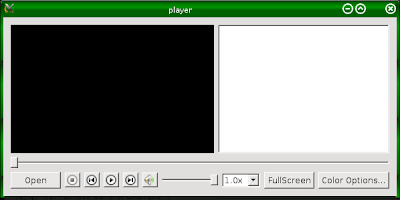
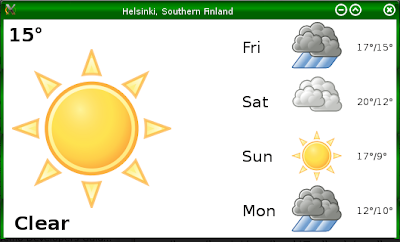
Now, let's try to see whether we're able to use qt-mobility in our programs.
We'll try to compile a very simple qt program using a class from the qt-mobility framework (QVideoWidget), though we won't do anything with that (just to see whether we can build the application).
here's the files of our project
myvideowidget.pro
QT       += core gui

TARGET = myvideowidget
TEMPLATE = app


SOURCES += main.cpp\
       mainwindow.cpp

HEADERS  += mainwindow.h

CONFIG += mobility
MOBILITY = multimedia
|
mainwindow.h
#ifndef MAINWINDOW_H
#define MAINWINDOW_H

#include <QMainWindow>

class QVideoWidget;
class QMediaPlayer;

class MainWindow : public QMainWindow
{
   Q_OBJECT

public:
   explicit MainWindow(QWidget *parent = 0);

private:
   QVideoWidget *videoWidget;
   QMediaPlayer *player;
};

#endif // MAINWINDOW_H
|
mainwindow.cpp
#include <QMediaPlayer>
#include <QVideoWidget>
#include <QTextEdit>

#include "mainwindow.h"

MainWindow::MainWindow(QWidget *parent) :
   QMainWindow(parent)
{
   videoWidget = new QVideoWidget(this);

   setCentralWidget(videoWidget);
}
|
main.cpp
#include <QtGui/QApplication>
#include "mainwindow.h"

int main(int argc, char *argv[])
{
   QApplication a(argc, argv);
   MainWindow w;
   w.show();
   return a.exec();
}
|
now, you should run the qmake of your qt installation you've used to build qt-mobility, thus
- ~/usr/local/Trolltech/qtsdk-2010.03/qt/bin/qmake myvideowidget.pro
and then run make, hopefully you should get no error. Note that we haven't named our qt-mobility installation directory anywhere here; there's no need to, since your qt installation was modified by qt-mobility, so that qmake will set all the variables for include files and libraries also for the qt-mobility path! In fact, you should see these compilation command lines:
- g++ -c -pipe -O2 -Wall -W -D_REENTRANT -DQT_NO_DEBUG -DQT_OPENGL_LIB -DQT_GUI_LIB -DQT_NETWORK_LIB -DQT_CORE_LIB -DQT_SHARED -I../../../../usr/local/Trolltech/qtsdk-2010.03/qt/mkspecs/linux-g++ -I../../myvideowidget -I../../../../usr/local/Trolltech/qtsdk-2010.03/qt/include/QtCore -I../../../../usr/local/Trolltech/qtsdk-2010.03/qt/include/QtNetwork -I../../../../usr/local/Trolltech/qtsdk-2010.03/qt/include/QtGui -I../../../../usr/local/Trolltech/qtsdk-2010.03/qt/include/QtOpenGL -I../../../../usr/local/Trolltech/qtsdk-2010.03/qt/include -I/home/bettini/usr/local/Trolltech/qtsdk-2010.03/qt/include/QtMultimediaKit -I../../../../usr/local/Trolltech/qt-mobility/include -I../../../../usr/local/Trolltech/qt-mobility/include/QtMultimediaKit -I/usr/X11R6/include -I. -I../../myvideowidget -I. -o mainwindow.o ../../myvideowidget/mainwindow.cpp
- g++ -Wl,-O1 -Wl,-rpath,/home/bettini/usr/local/Trolltech/qtsdk-2010.03/qt/lib -Wl,-rpath,/home/bettini/usr/local/Trolltech/qt-mobility/lib -o myvideowidget main.o mainwindow.o moc_mainwindow.o -L/home/bettini/usr/local/Trolltech/qtsdk-2010.03/qt/lib -L/usr/X11R6/lib -L/home/bettini/usr/local/Trolltech/qt-mobility/lib -lQtMultimediaKit -lQtOpenGL -L/home/bettini/usr/local/Trolltech/qtsdk-2010.03/qt/lib -L/usr/X11R6/lib -lQtGui -lQtNetwork -lQtCore -lGLU -lGL -lpthread
Now you can enjoy qt-mobility in your desktop :)


 Posts
Posts


