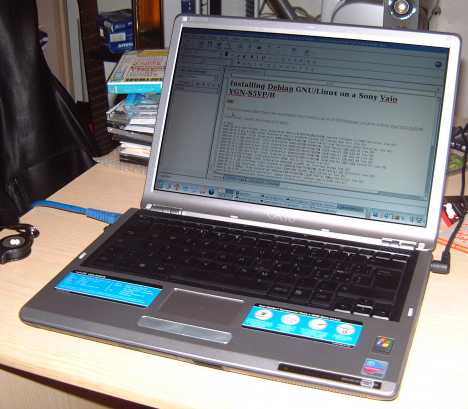
 The time has come I have to return this laptop to my Department, a Sony Vaio VGN-S5VP/B.
I can't say I'm sorry since I didn't like this laptop too much... probably what made me quite biased was the bad story concerning the extended battery (I talked about this issue in this blog).
However, before returning it, a few months ago, I tried to install on this laptop also Kubuntu (I was already using Debian).
The installation was quite smooth and everything seems to work (also things that were not working in Debian, or were quite hard to configure).
You can find details about this installation here: http://www.lorenzobettini.it/linux/kubuntu_vaio.
Showing posts with label sony vaio. Show all posts
Showing posts with label sony vaio. Show all posts
Tuesday, January 22, 2008
Goodbye Sony Vaio


Tuesday, July 31, 2007
Sony Vaio VGN/S5VP/B and a low cost battery
I have a Sony Vaio VGN-S5VP/B and I hadn't experienced big problems (not even with Linux), so I was pretty happy with it... the only thing that I don't like is that the battery has an autonomy of only 2 hours (trying to save energy with several means, e.g., in Linux with laptop mode did not help). So I wanted to buy an extended battery (4 hours)... 400 euros!!! That's a little bit too much isn't it? So I tried to look for a cheaper one ebay, and found it! With less than 100 euros I bought a VGP-BPL2 battery! I was pretty happy you might guess.
As soon as I received it I put it into charging and noticed that the battery led on the front was flashing continuously (with the original battery it only flashes once a second); well, I thought, it must be because it's an extended one...
Then, after a few hours I tried to turn on the laptop... first bad surprise: the laptop does not turn on: the power led lights but nothing happens. I tried and tried again, but even with the AC connected, the laptop does not power up if the new battery is present.
I then decided to turn on the laptop without the battery (but with the AC) and then I tried to insert the battery: after a few seconds, under Windows XP, a popup shows up saying that my computer was going to sleep because the battery may be incompatible. Second bad surprise. Notice that at that point I could also remove the AC cable and the laptop stayed on with the battery, so the laptop could use the battery after all.
I then found a post on a blog on the net, http://sarabannerman.blogspot.com/2007/04/sony-laptop-battery-mal-ware.html, reporting a similar problem (with a different Sony laptop model). This post says that "Sony laptops are running a little software program called ISBMgr.exe that generates this error when you insert a generic battery. It appears to be the only purpose of the software, and if you disable the software the generic battery works fine." I then disabled that service from MSConfig, and rebooted and found out that the popup message did not come up again!
At this point, I realized that I could actually use the battery, provided I started the computer without the battery on, insert the battery when the computer had started and then remove the AC power (not very comfortable, isn't it? But at lease, I could use the battery). The taskbar battery indicator (both on Linux and Windows) did not show a correct value, but I could stand that, even though that means that I had remember the amount of time I was using the laptop on battery since the system did not sense the correct charge value.
Then, after approximately one hour and half the computer turns off... well, I said, of course, the battery had finished its power, but the system did not realize that... so I put the battery on charge; in the meantime I was checking another post on the net, http://forum.notebookreview.com/showthread.php?t=20440, reporting similar problems and even worse that their battery was not being charged at all... Third bad surprise: I had the problem too... the continuous flashing was actually an error situation, since the battery was not being charged (the hour I was using the computer on battery I was actually using the charge the battery came with).
I then contacted the ebay seller about the problem and he said he would have asked for information about this issue; he then told me that they actually found out that my laptop model was probably having some hardware locks (the software lock consisting of ISBMgr.exe can be disabled as above) and that there was no way the battery could have been used with my laptop. Fourth bad surprise :-(
Fortunately, the seller offered me to take the battery back and to refund me completely.
So with this laptop I can only buy original (very expensive) battery... SHAME ON SONY! That's the last Sony laptop I'll have!
Sunday, December 31, 2006
BlueTooth under Linux on a Sony Vaio VGN-S5VP/B
 I finally took some time and tested bluetooth under GNU/Linux (Debian Testing) on my Sony Vaio VGN-S5VP/B. I had to say that everything went quite smooth, and everything seems to work fine (although I only tested file sending).
This post should be considered complementary to this page, where I described the installation of Debian GNU/Linux on this laptop.
First of all I installed all the necessary software:
apt-get install bluez-utils libbluetooth1 bluez-hcidump bluez-pin
and then I configured and recompiled the kernel (in this case a 2.6.18 installed from the Debian repository, i.e., it's not a vanilla kernel): under Networking enable Bluetooth Subsystem Support, and then, from there enable the options:
CONFIG_BT=mand then enable all the options in the bluetooth device drivers.
CONFIG_BT_L2CAP=m
CONFIG_BT_SCO=m
CONFIG_BT_RFCOMM=m
CONFIG_BT_RFCOMM_TTY=y
CONFIG_BT_BNEP=m
CONFIG_BT_BNEP_MC_FILTER=y
CONFIG_BT_BNEP_PROTO_FILTER=y
CONFIG_BT_HIDP=m
Once you boot with the new kernel you can check from dmesg the Bluetooth information:
dmesg | grep Bland you should see the above information.
Bluetooth: Core ver 2.10
Bluetooth: HCI device and connection manager initialized
Bluetooth: HCI socket layer initialized
Bluetooth: HCI USB driver ver 2.9
Bluetooth: L2CAP ver 2.8
Bluetooth: L2CAP socket layer initialized
Bluetooth: RFCOMM socket layer initialized
Bluetooth: RFCOMM TTY layer initialized
Bluetooth: RFCOMM ver 1.8
Bluetooth: BNEP (Ethernet Emulation) ver 1.2
Bluetooth: BNEP filters: protocol multicast
Now you can use the command hciconfig (which is basically the command that corresponds to ifconfig, but for bluetooth), and you should see something like:
hci0: Type: USBwhere mac address should report the mac address of your bluetooth device.
BD Address: mac addressACL MTU: 384:8 SCO MTU: 64:8
UP RUNNING PSCAN
RX bytes:602 acl:0 sco:0 events:60 errors:0
TX bytes:486 acl:0 sco:0 commands:40 errors:0

Moreover, you can scan for bluetooth devices with the following command:
hcitool scanfor instance, you should see your mobile phone mac address (if bluetooth is enabled on the mobile phone).
Now you can go on using your own software for accessing your bluetooth devices (probably described on a next post :-)
Subscribe to:
Posts (Atom)

 Posts


